
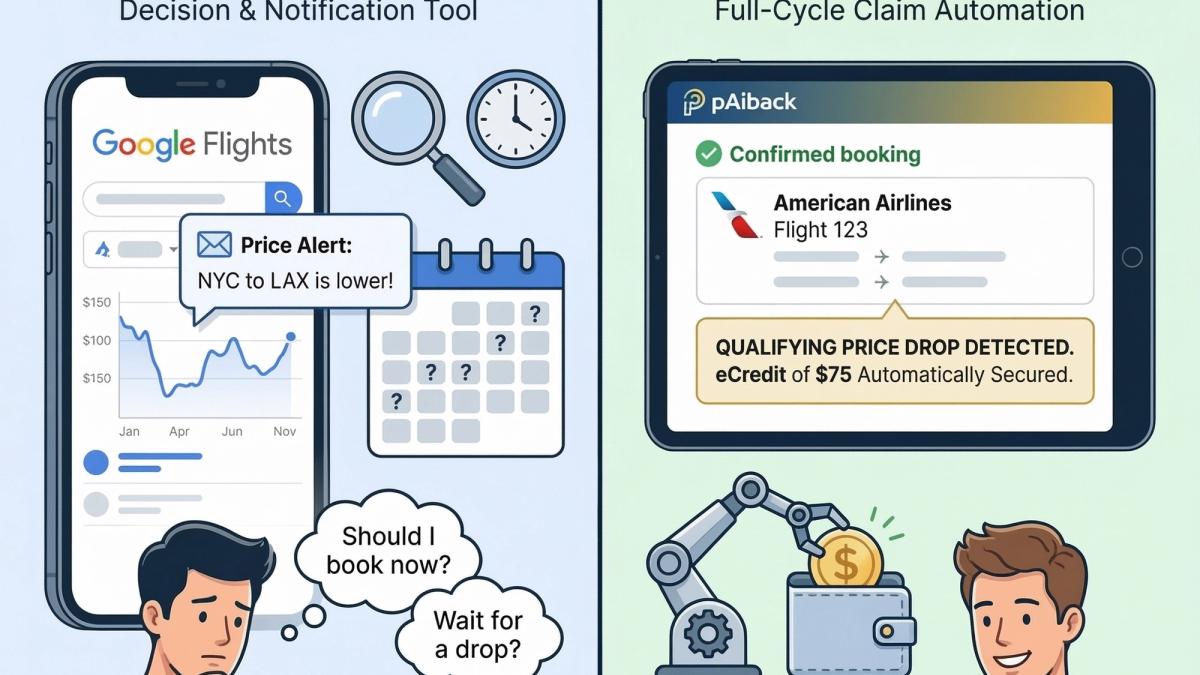
Google Flights Price Alerts vs. Automated Monitoring: What's the Difference?
Both tools exist to help travelers save money on flights. But they work in fundamentally different ways — and understanding that difference could be worth hundreds of dollars on your next trip.
If you've ever searched for tips on saving money on airfare, you've almost certainly been told to set up Google Flights price alerts. It's good advice — Google Flights is a genuinely powerful tool and one of the best flight search engines available to consumers today. Setting up a price alert is quick, it's free, and it puts useful information in your inbox when fares change.
But here's what most travelers don't realize: Google Flights price alerts and automated post-booking monitoring are two very different things. They solve two very different problems. And confusing them, or assuming one replaces the other, is quietly costing travelers real money, every day.
Let's break down exactly how each works, what each does well, and where the gap between them lies.
What Google Flights Price Alerts Actually Do
Google Flights price alerts are a pre-booking tool. Their primary job is to help you decide when to buy a ticket, not to protect you after you've already bought one.
Here's how they work: before booking, you search for a route on Google Flights, toggle on "Track prices," and Google sends you email notifications when that fare moves up or down significantly. According to Google's own support documentation, alerts fire when prices change significantly, meaning small fluctuations may not trigger a notification at all.
The alerts are genuinely useful for:
- Timing your purchase. If you're watching a route and prices are high, an alert telling you they've dropped is exactly the nudge you need to book.
- Flexible travelers. If your dates aren't fixed, Google lets you track "Any dates" on a route and will notify you when the minimum price on that route drops significantly over a month.
- Pre-booking research. Google Flights also displays price history and a "low/typical/high" indicator, helping you gauge whether now is a good time to book.
As NerdWallet puts it, Google Flights price alerts are a valuable tool for tracking prices for routes you want to book, the key phrase being "want to book." The tool is fundamentally oriented toward the decision of whether and when to purchase.
Google does offer a separate feature called the Price Guarantee, which on select eligible flights will automatically refund the difference if prices drop after booking, paid back via Google Pay. According to Google's official documentation, the refund is notified after your flight departs, prices must drop by at least $5 to qualify, and payouts are capped at $500 per year. Thrifty Traveler notes the feature currently appears most commonly on a limited set of carriers. It's a welcome safety net on the flights where it applies, but it's not available on every booking, and it doesn't extend across all major carriers.
What Google Flights price alerts don't do, by design, is automatically submit a credit claim to your airline when prices drop on a flight you've already booked. When you get an alert, you still have to act on it yourself: log in to your airline account, navigate the rebooking or price adjustment process, submit the request, and hope it goes through before the fare ticks back up. That gap between notification and action is where savings routinely get left on the table.
What Automated Post-Booking Monitoring Does
This is where pAiback operates — and it's solving a different problem entirely.
pAiback is a post-booking tool. Its job begins the moment your flight is confirmed, not before. Once you forward your confirmation email to pAiback (or connect your inbox for automatic detection), the platform's AI monitors your fare 24 hours a day, seven days a week, from the moment of booking until 24 hours before departure — across American Airlines, Delta, United, Hawaiian, and Alaska Airlines.
Here's the critical distinction: when pAiback detects a qualifying price drop, it doesn't send you an alert and ask you to go handle it. It automatically submits the credit claim to your airline on your behalf. The eCredit is secured and deposited into your airline wallet — and you find out after the fact that it happened.
That full-cycle automation matters more than it might initially seem, for a few reasons.
First, flight prices move constantly and unpredictably. Research from CheapAir has found that a single domestic fare can change price as many as 35 times before departure. Based on pAiback's own monitoring data, we've tracked qualifying price drops occurring up to 8 separate times on a single booking between confirmation and the day before departure. Each of those drops is a separate window to reclaim money. Catching all of them manually, acting on every alert within the window before the price rises again, would require near-constant vigilance.
Second, the window between alert and action is perishable. Airline fares can reverse in hours, or faster. Receiving a notification that your fare dropped is only valuable if you act on it immediately. Most travelers don't. They see the alert, think "I'll deal with that tonight," and by the time they log in, the lower fare has disappeared. Automated claiming eliminates this problem entirely, the claim is filed at the moment the drop is detected, not hours later when you happen to check your email.
Third, the claim process itself is cumbersome. As NerdWallet's guides on airline-specific rebooking document, the manual process for each carrier, navigating to the right page, selecting the correct option, confirming the original fare class still qualifies, is different for every airline and requires knowing exactly where to look. For most travelers, it's opaque enough to be a real deterrent.
A Side-by-Side Comparison
Google Flights Price Alerts
pAiback Automated Monitoring
Primary purpose
Help you decide when to book
Protect savings after you've booked
When it activates
Before booking
After booking confirmation
What it does when a price drops
Sends you a notification
Automatically claims the eCredit
Action required from you
Yes — you must act on the alert
None
Airlines covered
All searchable airlines
American, Delta, United, Hawaiian, Alaska
Cost
Free
Free to start; 20% convenience fee on savings secured
Price Guarantee feature
Select flights only; capped at $500/year; paid via Google Pay after departure
Full eCredit to your airline wallet; no cap
Captures multiple drops
Only if you act on each alert in time
Yes, automatically, up to departure
The Smart Traveler's Approach: Both Tools, Different Jobs
The honest answer is that these tools aren't really competitors, they're sequential. Google Flights price alerts help you find the right moment to book. pAiback takes over the moment you do.
Think of it this way: Google Flights helps you get a good price into your booking. pAiback makes sure you don't overpay after it.
Given that airline fares on a single itinerary can drop multiple times in the weeks between booking and departure, and that each of those drops represents a credit you're legally entitled to claim, having automated monitoring in place after you book isn't a luxury for obsessive deal-hunters. It's just completing the job that a price alert starts.
How pAiback Works in Three Steps
Setup takes about 60 seconds and requires no credit card:
1. Book your flight directly with any of the five supported airlines — American, Delta, United, Hawaiian, or Alaska — in Main Cabin or above.
2. Forward your confirmation email or connect your inbox for fully automatic detection.
3. pAiback does the rest. Our AI monitors your fare around the clock and automatically secures eCredits whenever qualifying price drops occur. You'll be notified when savings land in your airline wallet.
There is no fee unless pAiback saves you money. When it does, you keep 100% of the airline eCredit and pAiback earns a 20% convenience on the savings secured.
The Bottom Line
Google Flights price alerts are one of the best free tools available to travelers, and setting them up before you book is genuinely smart practice. But they were designed to help you get into a booking at the best possible price, not to protect you from every price movement that happens after you've already paid.
The money that gets left on the table isn't lost at the moment of booking. It's lost in the days and weeks that follow, when fares keep moving and most travelers have already moved on. That's the gap automated monitoring was built for.
Start tracking your flight for free at pAiback →
pAiback monitors booked flights on American Airlines, Delta, United, Hawaiian, and Alaska Airlines and automatically secures airline eCredits when qualifying prices drop. No monthly fees. You pay nothing unless we save you money.